ERPNext Projects: cost and bill every project from one record
ERPNext Projects tracks tasks, timesheets, purchases, stock and expenses against each project, so profit and loss is visible while the work is still running. Billable hours become sales invoices, and milestones can be invoiced through payment terms. It suits service firms, construction companies and make-to-order manufacturers.
- 1
- 2
- 3
- 4
- 5
Project. Created from a template or a sales order, with budget, dates and team.
Task. Breaks the work into tasks with owners, dates, dependencies and milestones.
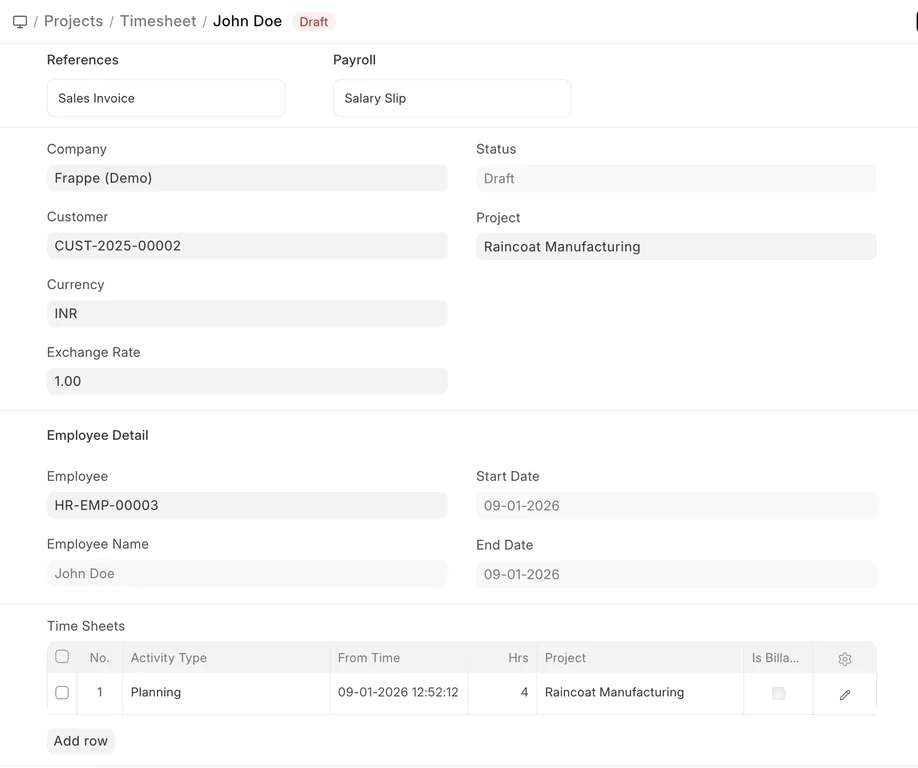
Timesheet. Records billable and non-billable hours against tasks at costing and billing rates.
Purchase Invoice. Material and services bought for the project are tagged to it.
Sales Invoice. Bills timesheets or milestone payment terms to the client.
At a glance
- Owned by
- Project director or PMO head
- Runs in
- ERPNext, standard module
- Works with
- Accounting, Buying, Inventory, HR and Payroll, CRM
- Packages
- Not a Starter Pack tier. Scoped within an ERPNext implementation, or the Success Pack (₹8,50,000 including 200 development hours).
What changes for your project team
We map how your team works today before configuring anything. These are the changes department heads notice first.
Key capabilities
- Tasks and dependencies
- Task trees, dependencies and milestones, with Gantt and kanban views.
- Project templates
- Repeatable task sets for standard jobs, applied when a project is created.
- Timesheets and billing
- Activity types with costing and billing rates, and timesheets billed through sales invoices.
- Project costing
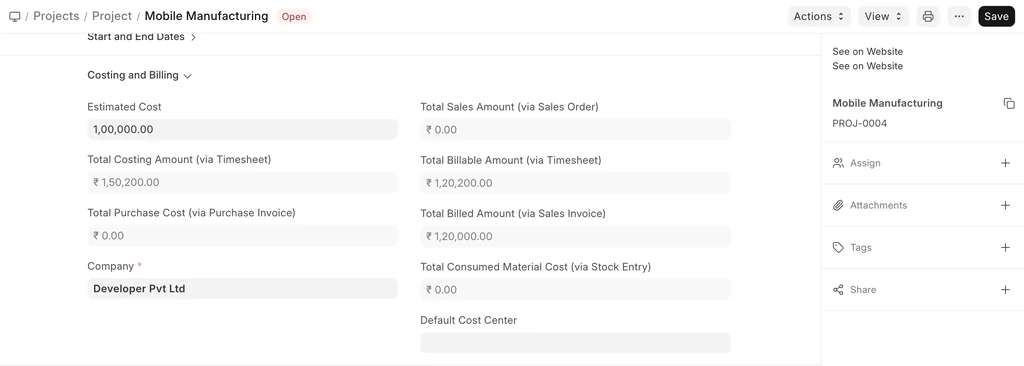
- Purchases, stock issued, expense claims and timesheets roll up to the project.
- Budgets by project
- Budgets against a project that warn or stop overspending.
- Customer portal
- Clients see their projects, tasks and timesheets, and raise issues online.
When the standard module does not cover one of your processes, we build the gap in a separate Frappe app, so ERPNext itself stays upgradeable. How we handle customization
See Projects in ERPNext
Screens for your project team, from Frappe’s official ERPNext documentation. Select one to see it.
Walkthroughs from Frappe
Official videos from Frappe’s YouTube channel. Nothing loads from YouTube until you press play.
Reports the project team gets as standard
These come with ERPNext. Each one can be filtered by company, period or dimension, printed, and exported to Excel.
- Project SummaryStatus, progress and cost for each project.
- Project ProfitabilityBilled revenue against employee cost, by project (with Frappe HRMS).
- Delayed Tasks SummaryTasks past their expected end date.
- Daily Timesheet SummaryHours logged by employee and project each day.
- Project wise Stock TrackingMaterial issued and purchased for each project.
- Budget Variance ReportBudget against actual by project.
How Projects connects to the rest of ERPNext
Every module writes to the same database. Nothing is exported, re-keyed or synced overnight between them.
- AccountingEvery cost and invoice tagged to the project feeds its profit and loss.
- BuyingPurchase orders and invoices carry the project for cost tracking.
- InventoryMaterial issued to a project is costed against it.
- HR and PayrollExpense claims and employee cost flow to the project.
- CRMA won sales order can create the project.
Project companies on ERPNext with Midocean
- Maruti Infrastructure
“We were struggling with fragmented systems until Midocean Technologies stepped in. Their ERPNext implementation has revolutionized our project management and financial tracking.”
Projects questions
Can it bill by milestone?
Yes. Mark tasks as milestones and set payment terms on the sales order; each term is invoiced when its milestone is signed off.
Can we see project profitability while the work is running?
Yes. Purchases, stock issued, expense claims and timesheet costs post to the project as they happen, and invoices show billed revenue against them.
Is there a Gantt chart?
Yes. Tasks show on a Gantt view with their dependencies and can be rescheduled by dragging.
Can clients see project status?
Yes. Customers with portal access can see their projects, tasks and timesheets, and raise issues.
Plan your projects rollout
A senior consultant walks through how your project team works today and recommends a scope for Projects, in writing.