ERPNext CRM: one record from first enquiry to invoice
ERPNext CRM tracks every lead, opportunity and quotation in the same system as stock, orders and invoices. Sales staff see price lists, stock and customer outstanding before they quote, and an accepted quotation becomes a sales order without re-keying. Targets by salesperson and territory are reported against actual sales.
Want a dedicated pipeline interface for the sales team? Frappe CRM is a separate app that can connect to ERPNext.
- 1
- 2
- 3
- 4
- 5
Lead. Records an enquiry from the website, email, a campaign or a scanned business card.
Opportunity. Tracks the deal by sales stage, expected value and closing date.
Quotation. Prices items from price lists and pricing rules, with taxes, in your print format.
Sales Order. Turns the accepted quote into an order that can reserve stock and trigger production.
Sales Invoice. Invoices against the order or delivery and creates the receivable.
At a glance
- Owned by
- Sales head
- Runs in
- ERPNext, CRM and Selling modules
- Works with
- Inventory, Accounting, Manufacturing, Buying, Projects
- Packages
- Selling is in the Core Starter Pack: ₹80,000, 40 hours, 30 days. GST extra; Frappe Cloud billed separately.
What changes for your sales team
We map how your team works today before configuring anything. These are the changes department heads notice first.
Key capabilities
- Leads and prospects
- Capture from web forms, email and campaigns, and group leads from one company under a prospect.
- Opportunity pipeline
- Sales stages, probability and expected closing date, with a kanban board by stage.
- Quotations and pricing
- Price lists, and pricing rules by customer group, territory or quantity, on every quotation.
- Email in context
- Linked email accounts log conversations against the lead, opportunity or customer.
- Campaigns
- Scheduled email campaigns to leads and contacts, with each lead’s campaign tracked to won business.
- Targets and commissions
- Targets by salesperson and territory, and sales partner commission on invoices.
When the standard module does not cover one of your processes, we build the gap in a separate Frappe app, so ERPNext itself stays upgradeable. How we handle customization
See CRM in ERPNext
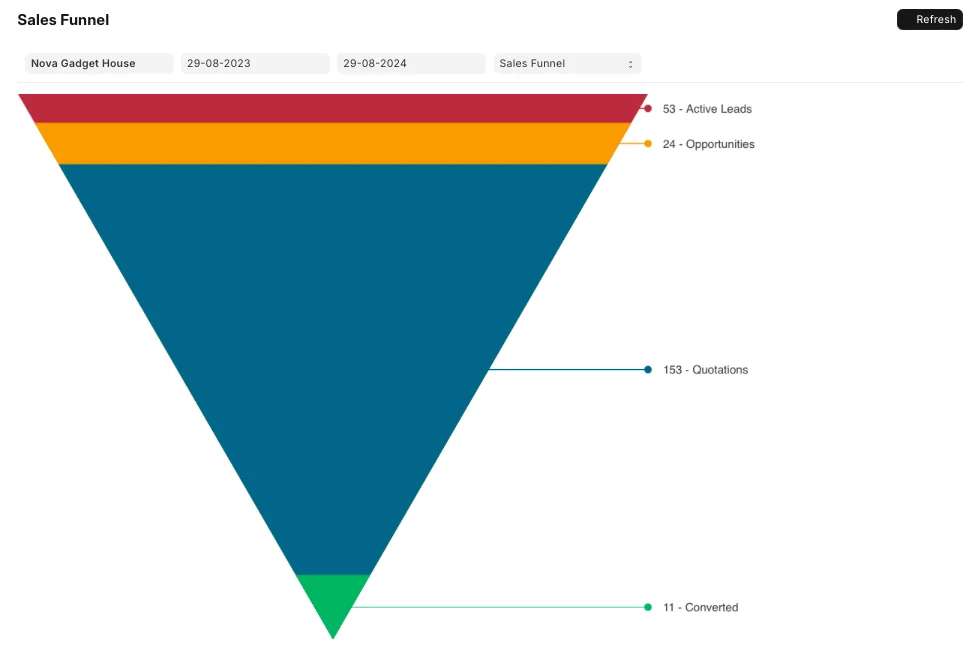
A screen for your sales team, from Frappe’s official ERPNext documentation.
Walkthroughs from Frappe
Official videos from Frappe’s YouTube channel. Nothing loads from YouTube until you press play.
Reports the sales head gets as standard
These come with ERPNext. Each one can be filtered by company, period or dimension, printed, and exported to Excel.
- Sales Pipeline AnalyticsOpen opportunity value by stage and owner.
- Opportunity Summary by Sales StageHow many deals sit at each stage.
- Lead Owner EfficiencyLeads converted to opportunities and quotations, by owner.
- Campaign EfficiencyLeads, opportunities and orders by campaign.
- Lost OpportunityDeals lost, with reasons and competitors.
- Sales Person Target Variance Based On Item GroupTarget against actual by salesperson.
- Inactive CustomersCustomers who have not ordered for a set number of days.
How CRM connects to the rest of ERPNext
Every module writes to the same database. Nothing is exported, re-keyed or synced overnight between them.
- InventorySales orders show available stock and can reserve it.
- AccountingInvoices create receivables; credit limits can stop new orders.
- ManufacturingSales orders feed the production plan or create work orders directly.
- BuyingPurchase orders for drop-ship or buy-to-order items can be raised from a sales order.
- ProjectsA won sales order can start a project with its tasks and billing.
Industries where CRM does the most work
- Trading and distributionLeads, quotations, price lists, sales targets and field visits.
- ManufacturingEnquiries to orders that drive production planning.
- E-commerceStore customers and orders in one customer record with stock and invoices.
- EducationAdmission enquiries and follow-up, with the Frappe Education app.
Sales teams on ERPNext with Midocean


PFive Bags previously ran leads and sales up to proforma invoice in Odoo. Both now run in ERPNext, alongside the company’s production, quality and accounts. See the case studies
CRM questions
Is ERPNext CRM the same as Frappe CRM?
No. ERPNext has CRM built in: leads, opportunities, quotations and campaigns. Frappe CRM is a separate app with its own pipeline interface that can connect to ERPNext. We help you choose based on how your team sells.
Does it integrate with LinkedIn?
Not as standard. Lead sources such as LinkedIn lead forms can be connected through their available APIs or an integration tool, scoped per source.
Can we set sales targets?
Yes. Monthly, quarterly or annual targets by salesperson or territory, split by item group, and reported against actual sales.
Can we capture leads from our website and email?
Yes. Web forms and incoming email can create leads automatically, and our ReynScanner app turns business card photos into ERPNext leads.
Can customers see their quotes and orders online?
Yes. The customer portal shows quotations, orders, invoices and shipments to logged-in customers.
Plan your sales rollout
A senior consultant walks through how your sales team works today and recommends a scope for CRM, in writing.